Shopify has become the default answer whenever someone asks how to start selling online. This Shopify review 2026 exists to answer that question directly. In this Shopify review 2026, we’re breaking down what the platform actually costs, what it does well, where it falls short, and whether it deserves the money you’d pay for it. LaunchWealthy has not run a Shopify store ourselves — this review is built from Shopify’s official documentation, verified 2026 pricing data, and a close read of how the platform actually functions for a beginner.
Shopify’s popularity isn’t an accident. It removes almost all the technical setup that used to stop non-developers from opening an online store — hosting, security, payment processing, and checkout all come bundled in. But “popular” and “worth paying for” aren’t the same question. Monthly subscriptions, transaction fees, and app costs add up fast, and plenty of beginners sign up without understanding the real total cost. This Shopify review evaluates Shopify’s pricing, features, ease of use, SEO capability, and how it stacks up against alternatives — so you can decide with your eyes open.
Quick Verdict
This Shopify review 2026 rating reflects a platform that’s strong for most beginners but not the cheapest way to launch.
Overall Rating: 4.2/5
- Best for: First-time entrepreneurs who want a working store without hiring a developer
- Not ideal for: Extremely budget-constrained beginners, or anyone who wants full code-level control
- Biggest advantage: Nothing to install, host, or secure yourself — it’s genuinely beginner-friendly
- Biggest disadvantage: Costs compound quickly once you add apps, a premium theme, and processing fees
- Best feature: The built-in checkout, which is fast, trusted, and optimized to convert
- Value for money: Strong on the Basic and Grow plans; harder to justify on Advanced unless you’re already scaling
- Final verdict: Shopify is worth it for most beginners who are serious about building a real store, but it is not the cheapest way to test a business idea
1. What Is Shopify?
Before going further into this Shopify review 2026, it helps to define the platform itself. Shopify is an all-in-one ecommerce platform that lets you build, host, and run an online store without writing code or managing a server. Instead of buying hosting separately, installing shopping-cart software, and stitching together a payment processor the way you would with a traditional website, Shopify bundles all of that into one monthly subscription.
It’s designed for people who want to sell something — physical products, digital downloads, print-on-demand items, or services — without becoming a web developer first. You pick a theme, add your products, connect a payment method, and your store is live. Shopify also powers larger operations: brands doing millions in annual revenue run on the same core platform, just on higher Shopify plans with more infrastructure.
The key difference between Shopify and building a “normal” website is that Shopify is purpose-built for transactions. A general website builder can display products, but it wasn’t designed around inventory, checkout, shipping calculations, tax rules, and fraud protection the way Shopify is from the ground up.
2. How Does Shopify Work?
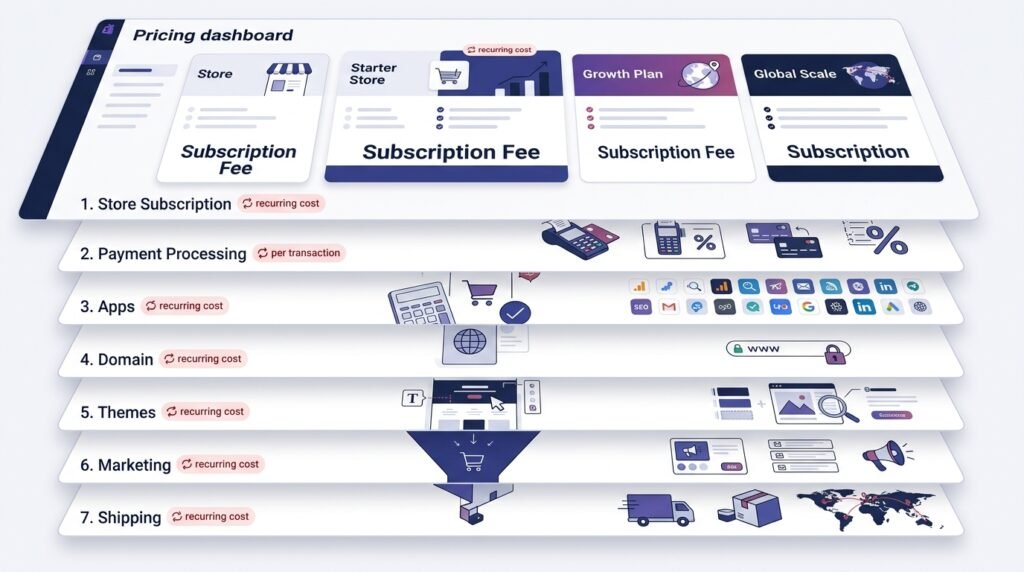
A core part of any honest Shopify review is walking through the actual setup process. Getting a Shopify store live follows a fairly linear process:
- Create an account — Sign up with an email address and store name; Shopify currently offers a short free trial.
- Choose a plan — Select the subscription tier that matches your business size (covered in detail in the Shopify pricing breakdown below).
- Select and customize a theme — Pick a free or paid theme and adjust colors, fonts, and layout using Shopify’s drag-and-drop editor.
- Add products — Upload photos, write descriptions, set prices, and organize products into collections.
- Configure payments — Turn on Shopify Payments (its built-in processor) or connect a third-party gateway.
- Set shipping and tax settings — Define shipping zones, rates, and applicable tax rules for where you sell.
- Connect a domain — Use a Shopify-provided domain or point your own custom domain to the store.
- Launch the store — Remove the password screen and go live to the public.
- Market the business — Set up email capture, social integrations, ads, and content to drive traffic.
- Track sales and improve performance — Use Shopify’s analytics dashboard to monitor conversion rate, top products, and traffic sources, then adjust.
None of these steps require coding, but several of them (tax setup, shipping logic, choosing the right apps) require research most beginners underestimate.
3. Shopify Pricing 2026
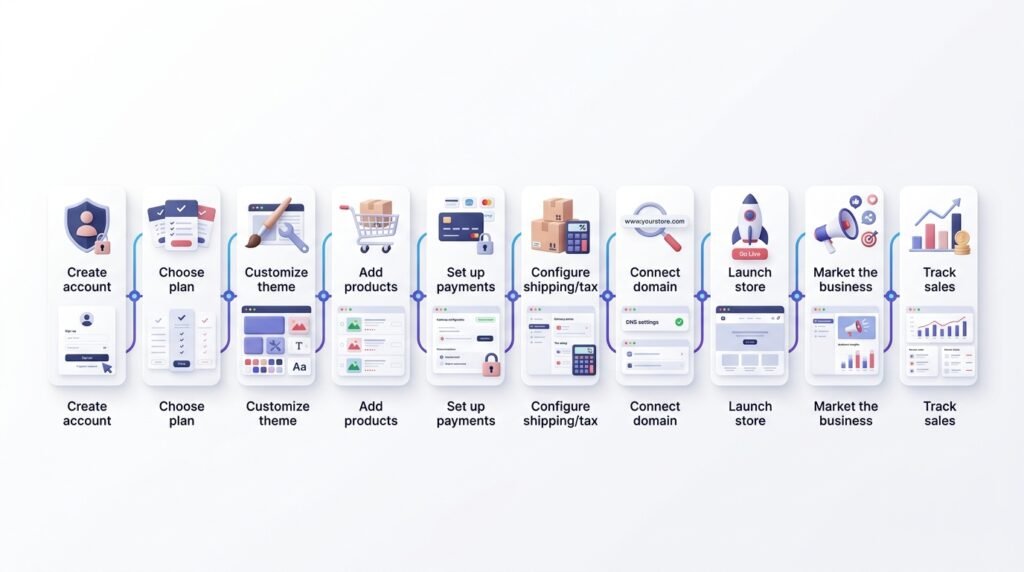
Shopify pricing 2026 is one of the most misunderstood parts of the platform because the advertised number is rarely the full story. Any thorough Shopify review needs to go beyond the sticker price, because Shopify pricing 2026 only tells part of the story until fees are factored in. As of 2026, Shopify’s core lineup includes four Shopify plans, plus a lightweight Starter option for social selling only. The table below breaks down each of the Shopify plans side by side.
| Plan | Monthly Cost | Best For | Key Features | Main Limitation |
|---|---|---|---|---|
| Starter | $5/month | Selling via social links or a “buy button” without a full storefront | Link-in-bio store, basic checkout | No full online store |
| Basic | $39/month ($29/month billed annually) | New store owners launching their first shop | Unlimited products, discount codes, basic reports, POS Lite | Fewer staff accounts, higher transaction rate |
| Grow | $105/month ($79/month billed annually) | Growing stores that need better reporting and lower fees | Professional reports, lower card rates, more staff accounts | Still limited automation vs. Advanced |
| Advanced | $399/month ($299/month billed annually) | Scaling businesses with real order volume | Advanced report builder, lowest standard card rates, more staff seats | Price jump is hard to justify below meaningful revenue |
| Plus | From roughly $2,300–$2,500/month | High-volume, enterprise-level operations | Checkout customization, dedicated support, B2B tools | Priced for established businesses, not beginners |
Picking the right tier among the Shopify plans above is really about matching your order volume to the fee structure, not just the sticker price.
Annual vs. monthly billing: Paying annually rather than monthly typically saves around 25% on Basic, Grow, and Advanced — a meaningful difference if you’re committed to the business, but a real risk if you’re still validating an idea. For anyone reading this Shopify review 2026, the important point is that annual billing only makes sense when you’re confident you’ll keep the store active long enough to benefit from the savings.
Transaction fees matter more than the subscription. If you use Shopify Payments, you’ll pay a card processing rate (roughly 2.9% + 30¢ online on Basic, dropping slightly on Grow and Advanced). If you use a third-party payment gateway instead of Shopify Payments, Shopify adds its own extra transaction fee on top — highest on Basic, lowest on Advanced. A complete Shopify review 2026 should therefore look beyond the monthly subscription and examine how these fees affect your actual profit margins.
The realistic total cost of a lean Shopify store includes the monthly subscription, card processing fees on every sale, a domain (roughly $10–20/year if you don’t already own one), and — for most stores — at least one or two paid apps for email marketing, reviews, or upsells. A beginner running a modest store on the Basic plan should budget meaningfully more than the $39 sticker price once processing fees and basic apps are factored in. Understanding the full picture of Shopify pricing 2026, rather than just the headline number, is the single biggest factor in whether the platform feels “worth it” once the bills start arriving.
That cost breakdown is one of the most important parts of this Shopify review 2026 because a platform can be easy to use while still becoming expensive as a store grows.
4. Shopify Features
No Shopify review 2026 would be complete without covering what you actually get for the subscription. Here’s the full feature set. When evaluating Shopify in 2026, these features are just as important as Shopify pricing because the value of the platform depends on what you receive for your monthly investment.
- Store builder: A drag-and-drop editor that lets non-developers build a functional storefront without touching code, which matters because it removes the single biggest barrier to launching.
- Themes: Free and paid design templates that determine how your store looks; paid themes often unlock more layout flexibility, which affects how professional your brand feels to a first-time visitor.
- Product management: Built-in tools for variants (size, color), bulk editing, and collections, which saves hours once you’re managing more than a handful of SKUs.
- Inventory: Tracks stock levels across locations, which matters the moment you sell the same product both online and in person.
- Payment processing: Shopify Payments is built in, meaning you can accept cards without applying for a separate merchant account — a real advantage for beginners with no processing history. Every Shopify pricing 2026 comparison should factor this in, since it removes a separate merchant-account cost entirely.
- Shopify checkout: Consistently rated among the fastest-converting checkouts in ecommerce, which directly affects how many visitors actually complete a purchase.
- Shipping tools: Calculates rates, prints labels, and can offer discounted shipping rates at higher tiers, which matters because shipping errors are a common source of lost margin.
- Marketing tools: Built-in email marketing, discount codes, and abandoned-cart recovery, which reduce the need to buy separate marketing software on day one.
- Analytics: Dashboards showing traffic, conversion rate, and sales trends, so you can make decisions based on data instead of guesswork.
- SEO features: Editable meta titles, descriptions, and URLs on every page, which matters for anyone relying on organic search traffic.
- Mobile management: A full mobile app for managing orders and inventory from a phone, useful for anyone running the business alongside other work.
- App ecosystem: Thousands of third-party apps extend functionality — but each one is a potential added cost and site-speed tradeoff.
- AI-powered tools: Shopify has expanded AI features for tasks like product descriptions, image editing, and store setup assistance, reducing manual work for solo entrepreneurs.
- Multi-channel selling: Sync inventory to sell on your own site, social platforms, and marketplaces from one back end, which matters if you don’t want to manage separate inventory systems.
5. Is Shopify Easy for Beginners?
Beginner Difficulty: 3/10
A recurring theme in any Shopify review is how approachable the platform is for non-technical users. Shopify is genuinely one of the easier ecommerce platforms to get started with. Setting up a basic store — theme, products, payments — is achievable in a weekend for most people with no technical background. The drag-and-drop editor and guided setup checklist do a lot of the heavy lifting. For beginners specifically, this is one of the strongest advantages highlighted in our Shopify review 2026.
Where beginners tend to struggle isn’t the store builder itself — it’s the decisions around it: choosing the right theme, understanding tax settings for their specific location, figuring out which apps are actually necessary versus nice-to-have, and writing product descriptions that convert. The platform is easy to use; running a profitable business on top of it is a separate skill entirely. Ultimately, our Shopify review 2026 finds that the software is relatively simple to operate, but building a profitable ecommerce business still requires strong product selection, marketing, customer service, and financial discipline.
6. Shopify Pros and Cons
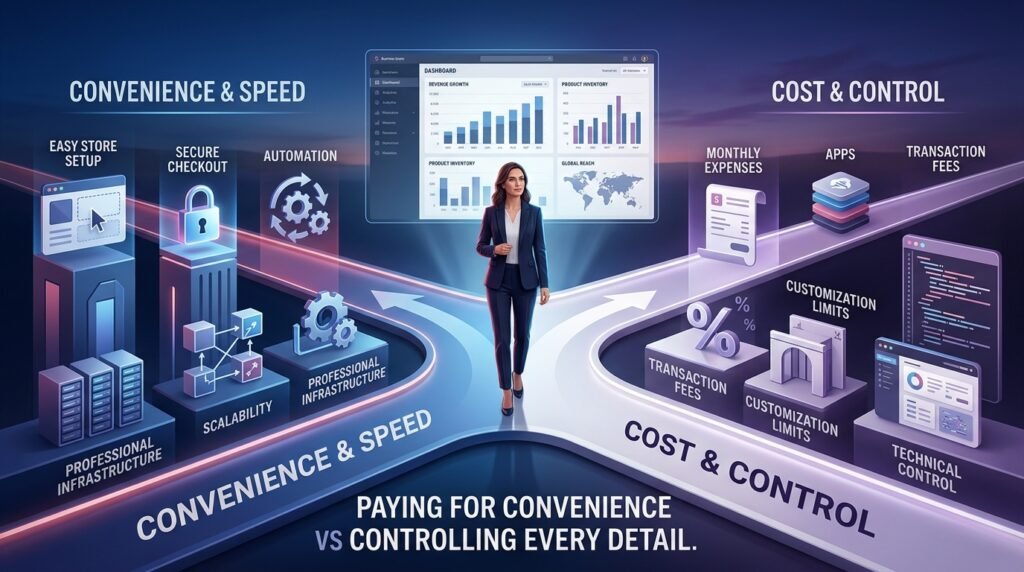
Weighing the Shopify pros and cons side by side makes the tradeoffs clearer than looking at either list in isolation.
Pro6. Shopify Pros and Cons
Pros
- No hosting or security management — Shopify handles servers, uptime, and security patches, removing a technical burden that would otherwise require ongoing attention. For this Shopify review 2026, that convenience is one of the platform’s strongest advantages for beginners.
- Fast, trusted checkout — A checkout experience shoppers already recognize, which can reduce cart abandonment compared to unfamiliar custom checkouts.
- Scales with the business — You can start on Basic and move up to Advanced or Plus without migrating platforms, which saves significant rebuild costs later. This scalability is an important factor when evaluating Shopify review 2026 results for a growing online business.
- Large app ecosystem — Nearly any functionality you need (subscriptions, loyalty, upsells) already exists as an app, saving custom development time.
- Strong documentation and support — Extensive help docs and support channels reduce how often you’re stuck without an answer.
- Built-in mobile management — Running order fulfillment and basic edits from a phone matters for anyone without a dedicated desk job.
- Multi-channel selling is straightforward — Syncing to social and marketplace channels from one dashboard avoids duplicate inventory work.
Cons
- Costs stack up fast — Subscription, transaction fees, apps, and a premium theme can push real monthly costs well above the advertised price. As this Shopify review 2026 shows, the advertised subscription price should never be treated as the complete operating cost.
- Third-party gateway penalty — Not using Shopify Payments adds an extra fee on every transaction, which can quietly erode margin.
- App dependency — Achieving features that feel like they “should” be built in often requires paid apps, adding recurring costs.
- Less control than a self-hosted store — You’re working within Shopify’s infrastructure, so deep customization has real limits compared to open-source platforms.
- Theme customization ceiling — Free themes can look similar to competitors’ stores, and truly unique designs often require developer help.
- Learning curve on the business side, not the tool — The platform is easy, but tax, shipping, and marketing decisions still require real research.
- Price jump between tiers can be steep — Moving between Shopify plans from Basic to Grow to Advanced represents a large cost increase relative to what many beginner stores actually need.
Taken together, this Shopify pros and cons breakdown is really a question of trading a bit of flexibility for a lot of convenience — and for most first-time sellers, that trade is worth it. That tradeoff is central to our Shopify review 2026 because the platform’s main value comes from reducing technical complexity rather than offering the lowest possible cost.
7. Shopify for Different Online Businesses
This part of the Shopify review 2026 breaks down fit by business model, since the “right” answer changes depending on what you’re selling.
Shopify for Dropshipping — Good Shopify integrates well with dropshipping apps for product sourcing and order fulfillment, making it one of the more common platforms for this model. The main cost consideration is that dropshipping margins are already thin, so subscription and transaction fees matter more here than for higher-margin businesses.
Shopify for Physical Products — Excellent This is Shopify’s core use case. Inventory tracking, shipping tools, and POS integration make it a strong fit for anyone selling tangible goods, whether handmade or manufactured.
Shopify for Digital Products — Average Shopify can sell digital products, but it wasn’t originally built for them — you’ll likely need an app to handle automatic file delivery. Platforms built specifically for digital products sometimes offer a smoother experience for that single use case.
Shopify for Print-on-Demand — Good Deep integrations with popular print-on-demand apps make this workflow simple to set up, though you’re dependent on the reliability and pricing of the fulfillment partner rather than Shopify itself.
Shopify for Small Brands — Excellent The combination of professional checkout, theme customization, and marketing tools gives small brands a credible storefront without an in-house developer.
Shopify for Beginners — Good The setup process is approachable, but beginners should go in expecting to spend on at least a few apps and understand that ease of setup doesn’t guarantee ease of generating sales. For beginners, this Shopify review 2026 finds that Shopify’s simplicity is valuable, but the business model still needs to make financial sense.
8. Shopify Fees: What Beginners Often Miss
This is the section every Shopify pricing 2026 discussion should start with, because it’s where real budgets go wrong. The subscription price is only the starting point. A complete Shopify review 2026 must also consider the additional expenses that can affect a store’s profitability. Costs beginners frequently underestimate include:
- Payment processing fees on every single sale, which apply regardless of how many sales you make
- The extra transaction fee for using a payment gateway other than Shopify Payments
- Paid apps for email marketing, reviews, upsells, or SEO — often $10–50/month each, and they add up quickly with three or four installed
- Premium themes, which can be a one-time cost but sometimes run into the hundreds of dollars
- Domain registration, typically an annual cost separate from the Shopify subscription
- Marketing spend on ads or influencer partnerships, which isn’t part of Shopify itself but is necessary to drive traffic
- Shipping supplies and rates, especially if underestimated during pricing
- POS Pro add-on, if you sell in person and want the upgraded point-of-sale toolkit
None of these individually feel like much, but stacked together they explain why a store advertised at “$39/month” often costs a new business several times that once it’s actually running.
9. Shopify SEO: Is It Good for Google?
A fair Shopify review 2026 has to address SEO directly, since it’s often the deciding factor for content-driven stores. Shopify gives you the technical building blocks for solid SEO: editable meta titles and descriptions, customizable URLs, alt text for images, an automatically generated XML sitemap, and built-in blogging so you can publish long-form content. It also handles canonicalization reasonably well by default and supports basic redirect management inside the admin panel, which helps avoid broken links when you rename products or collections.
That said, Shopify does not guarantee rankings. Site speed on image-heavy stores can be a weak point unless images are properly compressed, and some deeper technical SEO customization requires apps or theme code edits rather than being available out of the box. Ultimately, ranking on Google depends far more on content quality, backlinks, site authority, and genuine user experience than on which ecommerce platform you chose. Shopify won’t hold you back, but it also won’t do the SEO work for you — that still comes down to what you publish and how you structure it.
10. Shopify vs Other Ecommerce Platforms
No Shopify pricing 2026 discussion is complete without seeing how the cost and Shopify plans stack up against competitors.
| Platform | Best For | Ease of Use | Flexibility | Cost | Best Advantage |
|---|---|---|---|---|---|
| Shopify | All-in-one store, minimal tech setup | High | Medium | Subscription + transaction fees | Fastest path to a working store |
| WooCommerce | WordPress users wanting full control | Medium | High | Free plugin, but hosting/apps cost extra | Maximum customization on your own terms |
| Wix | Very simple stores with light catalogs | High | Low–Medium | Lower entry cost | Easiest visual design experience |
| Squarespace | Content- and design-led brands | High | Low–Medium | Mid-range | Strong design templates, good for portfolios-plus-shop |
| BigCommerce | Larger catalogs needing built-in features | Medium | High | Comparable to Shopify at scale | More native features without extra apps |
There isn’t one universal winner. Shopify suits people who want speed and reliability without managing infrastructure. WooCommerce suits people who already know WordPress and want full control over hosting and code. Wix and Squarespace suit smaller, design-first stores. BigCommerce is worth comparing directly against Shopify once you’re running a larger, more complex catalog.
11. Shopify Alternatives
If this Shopify review 2026 has you weighing other options, here’s how the main alternatives stack up.
- Best for maximum flexibility: WooCommerce — full control since it runs on your own WordPress hosting
- Best for beginners on a tighter budget: Wix — simpler pricing with fewer moving parts for a small catalog
- Best for content-focused businesses: Squarespace — strong for brands that lead with design and storytelling
- Best for larger ecommerce operations: BigCommerce — more built-in enterprise features without stacking as many apps
- Best lower-cost option to simply test an idea: Shopify Starter or a Wix entry plan — cheaper ways to validate demand before committing to a full store
12. Who Should Use Shopify?
Weighing the Shopify pros and cons above, here’s who tends to get the most value from the platform.
- First-time ecommerce entrepreneurs who don’t want to manage hosting or security
- Small businesses that need a professional storefront without hiring a developer
- Growing brands that expect to scale and want a platform that grows with them
- Dropshipping businesses that benefit from Shopify’s mature app integrations
- Product sellers who need reliable inventory and shipping tools
- Entrepreneurs who’d rather focus on marketing and product than technical infrastructure
113. Who Should NOT Use Shopify?
And on the other side of the Shopify pros and cons ledger, here’s who should look elsewhere. A balanced Shopify review 2026 should make it clear that Shopify isn’t the right solution for every entrepreneur.
- People with an extremely limited budget who aren’t yet sure the business idea will work. If you’re still testing demand, the ongoing costs highlighted throughout this Shopify review 2026 may be difficult to justify before generating consistent sales.
- Developers who want full, unrestricted control over their code and hosting environment. A self-hosted solution such as WooCommerce may provide more flexibility for users who are comfortable managing technical infrastructure.
- Businesses with unusual technical requirements that don’t fit Shopify’s app-based model well. Before choosing Shopify, review your technical requirements carefully to determine whether the platform can support your specific workflow.
- People who don’t actually need a full ecommerce platform — a simple landing page or marketplace listing might solve the problem more cheaply. As this Shopify review 2026 demonstrates, paying for a full ecommerce platform only makes sense when you actually need its features.
14. Shopify Review 2026: Final Verdict
This final section of our Shopify review 2026 pulls everything together. Is Shopify worth it in 2026? For most people seriously starting an online business, yes — with a clear understanding of the real costs involved.
- Ease of use: 4.5/5
- Features: 4.3/5
- Pricing/value: 3.8/5 — reflecting the gap between advertised Shopify pricing 2026 and real-world cost
- SEO: 4/5
- Flexibility: 3.5/5
- Beginner-friendliness: 4.5/5
- Ecommerce capabilities: 4.5/5
- Overall value: 4.2/5
Across every category we scored in this Shopify review 2026, pricing/value is where the platform loses the most points relative to ease of use.
Shopify earns its reputation because it removes the technical barriers that used to stop non-developers from launching a store, and its checkout is genuinely strong. But it isn’t the cheapest option, and the advertised subscription price undersells the real monthly cost once processing fees and apps are added. For readers comparing Shopify pricing 2026 with competing ecommerce platforms, this cost difference is an important part of the final decision.
Choose Shopify if you’re ready to commit to building a real business and want the fastest, most reliable path to a working store. Choose an alternative like WooCommerce if you want full control and are comfortable managing more of the technical side yourself, or a simpler builder like Wix if you’re still validating whether your product idea has demand at all before investing more.
This Shopify review 2026 comes down to a simple tradeoff: you’re paying for convenience, not just software. If that convenience is worth the monthly cost to you, Shopify remains one of the strongest platforms available for launching an online store this year. That’s the full picture behind this Shopify review 2026.
Is Shopify worth it in 2026?
For most beginners building a real online business, yes. Shopify’s ease of use and reliable checkout justify the cost for anyone serious about selling, though the total monthly cost is higher than the advertised subscription once fees and apps are included.
Is Shopify good for beginners?
Yes. The store builder requires no coding knowledge, and the guided setup process makes launching a basic store achievable within days. The harder part is the business decisions around the platform, not the platform itself.
How much does Shopify cost per month?
Core plans currently run from $39/month (Basic) up to $399/month (Advanced) when billed monthly, with roughly 25% savings on annual billing. A lightweight Starter plan is available at $5/month for social-only selling.